How to Protect a Water Pump Motor from Overload
Protect a water pump motor from overload: why pump motors overheat, how to select and set an MPCB, and which pump-specific protections to add.
Read More
Have you ever wished your electrical panel could talk back—or at least tell you why a circuit tripped at 2:00 a.m.? That’s exactly where a smart breaker switch comes in. Instead of being a silent, purely mechanical safety device, it adds sensing, connectivity, and control so you can monitor loads, receive alerts, and (in many cases) switch circuits remotely—without sacrificing the core job of circuit protection.
In this article, we’ll break down how a smart breaker switch works, where it’s worth using, which smart features matter, and how to compare options confidently—so you can choose a solution that fits your building, your operations, and your risk tolerance.
At its heart, a breaker is still a breaker. It must interrupt fault current fast and reliably during overloads and short circuits. A smart breaker switch builds on that foundation by layering in measurement and communication—typically through an onboard module, a companion gateway, or an integrated “connected” breaker design.
What you usually get:
What it doesn’t do:
| Traditional breaker | Smart breaker switch |
|---|---|
| Trips mechanically on fault | Trips mechanically and reports events |
| No visibility until someone checks | Remote status + notifications |
| No energy data | Often includes energy monitoring |
| Manual switching only | Often supports remote controlled circuit switching |
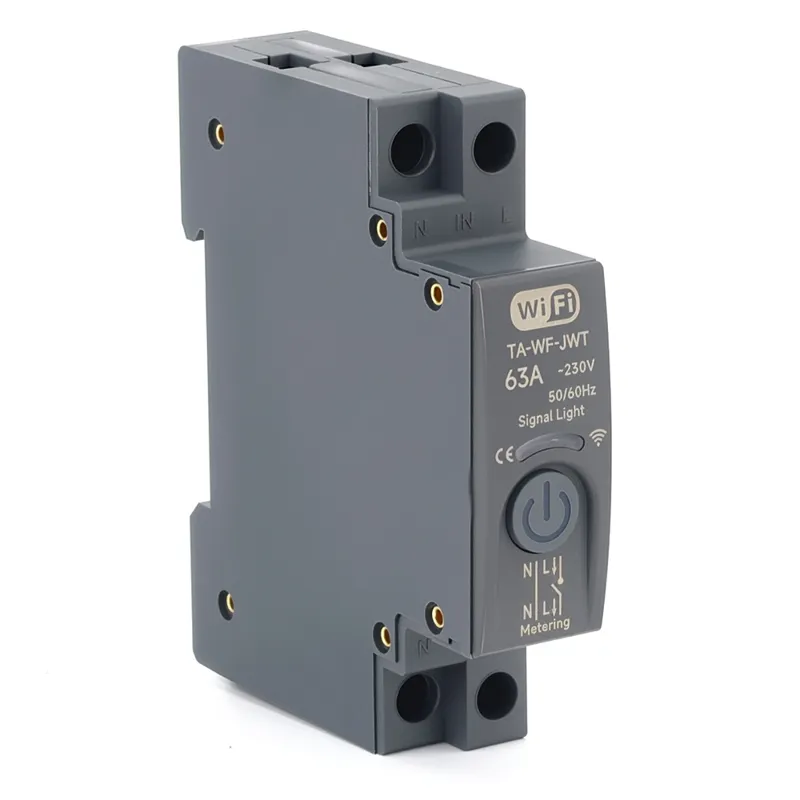
You can install a smart breaker switch in homes, but the biggest value often shows up in commercial and industrial settings—anywhere downtime, energy cost, or compliance pressure is real.
Commercial buildings
Industrial and light manufacturing
Critical facilities (data rooms, labs, healthcare)
Solar + EV + distributed energy
| Use case | Why it’s a strong fit |
|---|---|
| Multi-tenant sites | Per-circuit usage insights and accountability |
| Remote sites | Fewer truck rolls for resets and checks |
| High energy bills | Identify always-on loads and peak drivers |
| High uptime needs | Faster diagnosis and better event data |
Not all “smart” is equally useful. Some features look great on a spec sheet but don’t move the needle day to day. If you’re evaluating a smart breaker switch with energy monitoring or remote control, focus on features that reduce risk, time, and cost.
You want more than “it tripped.” Look for:
Some devices measure true RMS current and voltage per pole; others estimate. Confirm:
Remote on/off can be great—until someone uses it wrong. Better implementations include:
A WiFi-only approach can be fine for small sites, but industrial deployments often prefer wired or gateway-based systems. Consider:
| Feature | Why you should care |
|---|---|
| Event logs | Faster root-cause analysis |
| Energy monitoring | Finds waste and validates savings |
| Alerts | Reduces response time to faults |
| Integration | Avoids data silos and manual reporting |
| Permissions | Prevents “oops” switching moments |

A smart breaker switch is still an electrical protection device, so the “smart” layer is secondary to safety, ratings, and compliance. If you only remember one thing: fault interruption capability comes first.
| Checklist item | What to verify |
|---|---|
| Interrupting rating | Meets available fault current |
| Voltage + poles | Matches system topology |
| Protection functions | Overload/short + optional leakage/arc |
| Mounting format | Panel compatibility (DIN rail, MCCB, etc.) |
| Comms method | Works with your network + uptime needs |
| Local fallback | Safe operation even if internet is down |
When you compare a smart breaker switch across brands, you’ll notice that marketing language is often similar. The differences show up later—during commissioning, integration, and the first real fault event.
A practical approach is to shortlist 2–3 candidates, then run a pilot on a small panel:
If you’re planning a retrofit or a multi-panel deployment, a quick way to reduce rework is to share your one-line diagram and load list with us—we can help you map the right smart breaker switch types, ratings, and monitoring points and provide a clean quotation path without guesswork.
A smart breaker switch is not a “swap and pray” component. Treat it as both a protection device and a monitoring endpoint.
The upfront price of a smart breaker switch is typically higher than a standard breaker, so ROI depends on what you’re trying to improve: downtime, labor, energy efficiency, or compliance reporting.
| Cost element | What to account for |
|---|---|
| Hardware | Breaker + gateway/module (if needed) |
| Installation | Electrical labor + commissioning time |
| Networking | Coverage, VLANs, gateways, security review |
| Software | Licenses, cloud fees, data retention |
| Operations | Maintenance, updates, support |
A smart breaker switch can be a genuinely practical upgrade when you want better visibility, faster fault response, and more control over how circuits behave in real life—not just on paper. The key is to treat it first as a protection device (ratings, standards, coordination) and second as a data and automation tool (features, integration, cybersecurity, lifecycle support). Once you match the specs to your system and choose features that fit your operations, you’ll get more than a “connected panel”—you’ll get fewer surprises, cleaner energy insights, and a smoother path to scaling monitoring across sites.
Sometimes, yes. A smart breaker switch can provide useful circuit-level trends, but a dedicated electric power meter is often preferred when you need higher accuracy, revenue-grade measurement, or compliance reporting.
An electric power meter is designed specifically for measurement and may offer better accuracy classes, calibration options, and audit-friendly documentation. Breaker-based monitoring is great for operational visibility, but it may not meet stricter metering requirements.
In many real-world setups, tenant billing requires clear accuracy standards and consistent measurement practices. Even if your breaker data looks good, verify whether a certified electric power meter is required by your local regulations or contract terms.
Match the CT ratio to your expected load range, confirm burden and accuracy class, and ensure the CT type fits your conductor size and installation environment. Incorrect CT selection is one of the fastest ways to get misleading readings.
Yes—and it’s often a strong approach. Use electric power meters at main incomers or critical feeders for high-confidence totals, then use smart breakers for branch-circuit visibility and faster troubleshooting.